By Aeruxo — Licensed Flight Dispatcher | 15+ Years in Airline Operations
Here is a secret from 15 years inside the Operations Control Center: the tools I use to track your flight professionally are not that different from the tools you can use yourself. The professional systems have more data and faster updates, but the consumer flight tracking apps available on your phone today give you access to information that would have been unimaginable to passengers even a decade ago.
The difference is not the tools—it is knowing what to look for. A dispatcher does not just track your flight. A dispatcher tracks the aircraft that will become your flight, monitors the weather at three different airports simultaneously, watches for ATC flow restrictions, and interprets patterns that predict delays before they are announced. And you can learn to do most of this yourself.
This article teaches you how to track your flight the way I do—using 7 tools and techniques that transform you from a passive passenger waiting at the gate into an informed traveler who often knows about delays, gate changes, and cancellations before the airline announces them.

Key Takeaways
- Track the inbound aircraft, not just your flight number. Your flight’s on-time performance depends entirely on whether the aircraft assigned to it arrives on time from its previous route. Flight tracking apps let you see exactly where that aircraft is right now.
- Weather at three locations matters: your departure airport, your destination, and the airport your aircraft is currently at. Checking all three gives you a prediction window that the airline’s app does not provide.
- Flightradar24 and FlightAware are the two essential apps for any traveler. Both are free with optional paid upgrades, and together they give you roughly 80% of the flight tracking capability I use professionally.
- METAR data is publicly available and easier to read than you think. Learning to decode a basic METAR gives you real-time airport weather information faster than any weather app.
- The best time to check is 3-4 hours before departure—early enough to take action if you spot a developing problem, but late enough that the data is operationally relevant.
Tool 1: Flightradar24 — The Dispatcher’s Favorite Consumer App
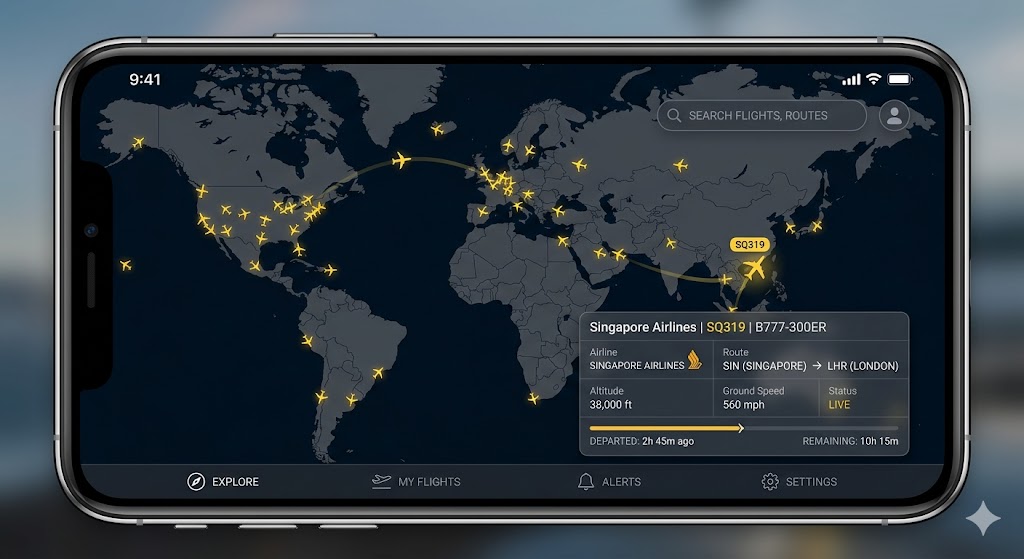
If I could only recommend one app to every traveler, it would be Flightradar24. It is the most comprehensive real-time flight tracking service available to the public, and I regularly cross-reference it even from my professional workstation.
What it does: Flightradar24 shows you every commercial (and many private) aircraft in the sky, in real-time, on a global map. Tap any aircraft icon to see its flight number, airline, aircraft type, altitude, speed, departure airport, destination, and estimated arrival time. You can search by flight number, route, or airport.
The pro move: Do not just search for your flight number. Search for the aircraft registration or tail number. This shows you the aircraft’s entire day of flying—every route it has operated and every route it is scheduled to operate. If the aircraft that will become your evening flight is currently running 45 minutes late on its morning route in Japan, you can predict that your flight will also be delayed—potentially hours before the airline updates its app.
Free vs. paid: The free version gives you basic flight tracking with ads. The Silver subscription (roughly $2/month) removes ads and adds 90 days of flight history. The Gold subscription adds weather radar overlays, real-time ATC audio, and extended aircraft history. For a frequent traveler, Gold is worth every penny.
Tool 2: FlightAware — The Best Delay Predictor
FlightAware is the other essential flight tracking app, and it excels in one area where Flightradar24 is weaker: delay analysis and prediction.
What makes it special: FlightAware’s “Where is my plane now?” feature tracks the inbound aircraft for your flight and shows you, in plain language, whether it is on time, delayed, or still at its origin. It also provides a delay cause when available (weather, ATC, aircraft).
The pro move: Check FlightAware’s airport delay page for both your departure and destination airports. It aggregates FAA and global airport status data into a simple dashboard showing current delays, ground stops, and flow control programs. This is almost identical to the airport status information I check in the OCC when assessing whether a flight will operate on time.
Alerts: Set up push notifications for your flight number. FlightAware sends alerts for gate changes, delays, cancellations, and diversions—often faster than the airline’s own notification system. I have had friends tell me that FlightAware alerted them to a gate change 15 minutes before the airport’s display board updated.
Tool 3: Track the Inbound Aircraft — The Dispatcher’s #1 Trick
This is the single most powerful technique for predicting delays, and it is exactly what I do professionally every day.
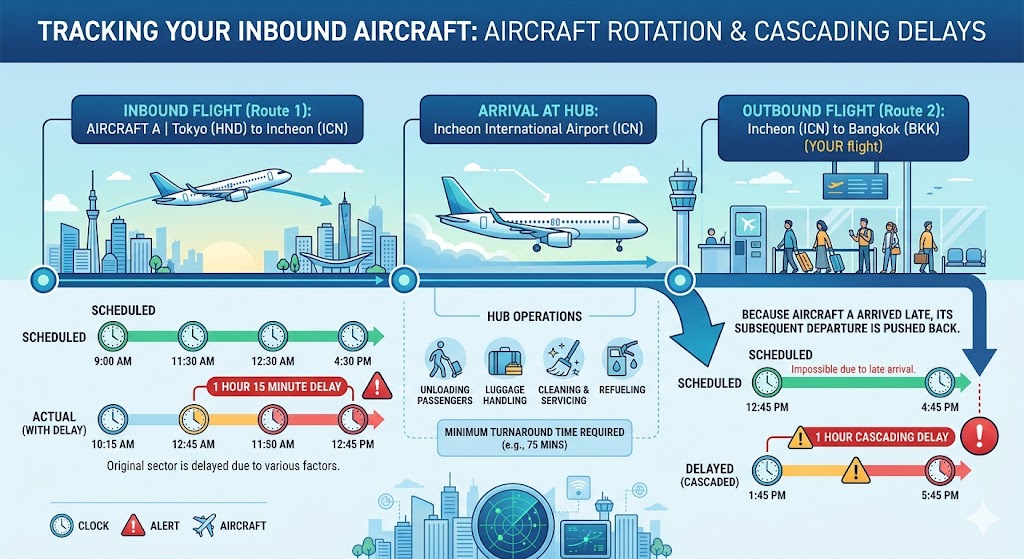
As I explained in my article on flight delays, the domino effect is the single biggest cause of delays. One aircraft flies 4-6 routes per day. A delay on the first route cascades to every subsequent flight on that aircraft’s schedule.
How to do it:
Step 1: Open Flightradar24 or FlightAware and search for your flight number.
Step 2: Look at the aircraft registration (tail number) assigned to your flight. Both apps show this information.
Step 3: Tap the aircraft registration to see its full daily schedule. Where is it right now? What route is it currently operating? Is it on time?
Step 4: Calculate. If your aircraft is currently in Osaka and running 60 minutes behind schedule, and it needs to fly to Incheon (2.5 hours), turn around (45 minutes), and then operate your flight to Bangkok—your Bangkok departure will be at least 60 minutes late, probably more.
This is exactly the calculation I perform dozens of times per shift. The only difference is that I have the data on a professional flight tracking system, and you have it on your phone. The math is the same.
When to check: Start monitoring the inbound aircraft 4-6 hours before your departure. This gives you enough lead time to take action (adjust your airport arrival time, prepare for a connection risk, or even preemptively contact the airline) if you spot a developing delay.
Tool 4: Weather Radar — Check Three Airports, Not One
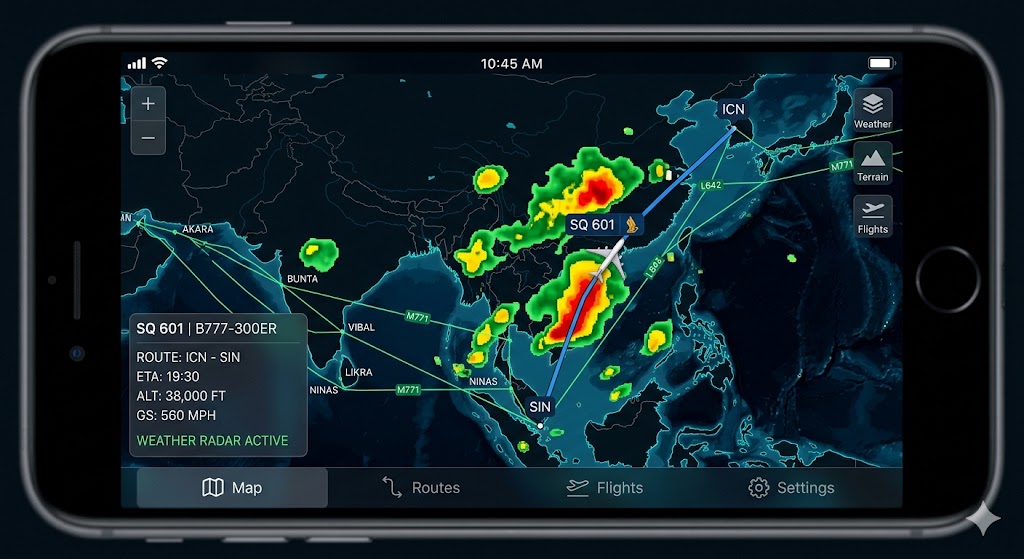
Most passengers check the weather at their destination. A dispatcher checks the weather at three locations: your departure airport, your destination airport, and the airport where your aircraft currently is.
Why all three matter:
Departure airport weather affects whether your flight can take off on time. Snow and ice cause deicing delays. Fog causes low-visibility delays. Thunderstorms cause ground stops.
Destination airport weather determines whether your flight can land on arrival. If the destination is forecast to be below minimums, your flight may be delayed, diverted, or cancelled.
Aircraft’s current location weather affects whether the inbound aircraft can depart on time. If your aircraft is stuck in Sapporo due to a blizzard, your flight in Incheon—where the weather is fine—will be delayed because the aircraft cannot get to you.
How to do it: Flightradar24 Gold includes a weather radar overlay. Alternatively, use Windy.com (free, excellent global weather radar and forecast) alongside your flight tracker. Cross-referencing flight position with weather radar is one of the most valuable skills you can develop as a traveler—it lets you predict weather-related disruptions before they are announced.
Tool 5: METARs — Read Airport Weather Like a Dispatcher
A METAR is a standardized weather observation report issued every 30-60 minutes at airports worldwide. It is the exact weather data I use to make dispatch decisions, and it is publicly available for free.
Where to find them: Aviation Weather Center (aviationweather.gov), the METAR section of FlightAware, or apps like Windy that include aviation weather data.
How to read a basic METAR: A METAR for Incheon might look like this:
RKSI 071200Z 27015KT 9999 FEW040 SCT100 22/15 Q1013
Here is what it means: RKSI = Incheon Airport. 071200Z = 7th of the month at 12:00 UTC. 27015KT = wind from 270° at 15 knots. 9999 = visibility greater than 10 km (excellent). FEW040 SCT100 = few clouds at 4,000 feet, scattered at 10,000 feet. 22/15 = temperature 22°C, dewpoint 15°C. Q1013 = atmospheric pressure 1013 hPa.
This tells me: clear weather, good visibility, moderate wind—no operational issues. If the visibility number drops below 1000 (meters), or if you see codes like TS (thunderstorm), FG (fog), SN (snow), or +RA (heavy rain), those are the conditions that cause delays and disruptions.
You do not need to become a meteorologist. Just learning to recognize “good METAR” versus “bad METAR” gives you a 30-minute head start on airline delay notifications.
Tool 6: Airline App + Status Alerts — The Basics Done Right
The airline’s own app remains the authoritative source for your specific booking information: gate assignment, boarding time, rebooking options, and official delay notifications. The third-party trackers supplement this with broader data, but the airline app is where you manage your booking.
Pro tips for the airline app:
Enable all push notifications. Gate changes, delay updates, cancellation alerts—turn everything on. These notifications are often the airline’s fastest communication channel, faster than email or the departure board.
Check the app before leaving for the airport. A quick check 2-3 hours before departure can save you a wasted trip to the airport if your flight has already been cancelled or significantly delayed. As I advised in my article on cancellations, knowing your status before you leave home gives you options that disappear once you are at the airport.
Have the app installed and logged in before your travel day. During disruptions, when you need to rebook quickly, fumbling with account creation or login issues costs precious minutes. The fastest rebookers—the ones who get the best alternative flights—are the ones who are already set up and ready to act the moment a cancellation notification arrives.
Tool 7: NOTAM Check — The Advanced Technique
This one is for the truly dedicated traveler. NOTAMs (Notices to Air Missions) are official advisories issued to pilots and dispatchers about conditions that could affect flight operations: runway closures, airspace restrictions, navigation aid outages, volcanic ash warnings, and more.
Where to find them: The FAA’s NOTAM search (notams.aim.faa.gov) covers U.S. airports. For international airports, the ICAO’s Global NOTAM Database or Eurocontrol’s NOTAM system are available. Many flight tracker apps also include NOTAM data in their airport information pages.
What to look for: Runway closures (which can cause delays at airports with limited runways), airspace restrictions (military exercises, VIP flights), and volcanic ash NOTAMs (which can close entire flight corridors). If you see a NOTAM closing a runway at your destination airport during your expected arrival time, prepare for a possible delay.
Realistic expectation: NOTAMs are written in a technical format designed for aviation professionals. They are not easy to read casually. But even a basic scan for keywords like “RWY CLSD” (runway closed), “AIRSPACE” (restriction), or “VOLCANIC ASH” gives you information that most passengers never access.
Putting It All Together: The Pre-Flight Checklist

Here is the exact sequence I recommend for every flight, adapted from my professional pre-departure assessment:
24 hours before departure: Check the weather forecast for departure, destination, and the aircraft’s origin airport. Look for any developing weather systems (typhoons, winter storms, volcanic activity) that could disrupt your route. Set up flight alerts on FlightAware for your flight number.
6 hours before departure: Begin tracking the inbound aircraft. Is it on schedule? Is there any delay building on its current route? Check the airline app for any schedule changes or gate assignments.
3 hours before departure: Pull the current METAR for your departure and destination airports. Check weather radar for any precipitation or storm cells along the route. Verify that your inbound aircraft is still on track. This is your “go/no-go” assessment for leaving home.
At the airport: Continue monitoring. Gate changes, delay updates, and cancellation decisions can happen at any time. If you spot your inbound aircraft running late, you know a delay is coming before the departure board shows it—giving you time to find a comfortable seat, grab a meal, or investigate rebooking options.
Why This Matters: Information Is Power

Throughout this blog, I have written about the systems that keep you safe: the layers of aviation safety, the go-around procedures, the engine failure planning, the medical emergency response. All of these systems work regardless of whether you understand them. You do not need to be a dispatcher to be safe on a plane.
But you can be a dispatcher-level traveler when it comes to managing disruptions. The tools described in this article—Flightradar24, FlightAware, weather radar, METARs, and the inbound aircraft tracking technique—give you the information advantage that separates calm, prepared travelers from stressed, reactive ones.
The next time a delay is coming, you will know before the announcement. The next time a gate changes, your phone will buzz before the board updates. The next time a typhoon threatens your route, you will be monitoring it alongside the dispatchers—and preparing your backup plan while other passengers are still oblivious.
That is what it means to track your flight like a dispatcher. Not just watching a dot on a map—but understanding the entire operational picture that determines whether that dot arrives on time.
Welcome to the OCC. Your phone is your workstation.
Learn more about our mission and operational background on the About Aeruxo page.
Frequently Asked Questions
What is the best free app to track your flight?
For overall tracking capability, Flightradar24 (free version) is the best single app. It shows real-time aircraft positions, flight routes, aircraft details, and airport information. FlightAware is the best free option for delay prediction and airport status. I recommend installing both—they complement each other. Flightradar24 excels at visual tracking and aircraft history; FlightAware excels at delay analysis and alerts.
How can I find out if my flight will be delayed before the airline tells me?
Track the inbound aircraft. Your flight’s aircraft is currently operating another route. If that route is delayed, your flight will almost certainly be delayed too. Use Flightradar24 or FlightAware to find your aircraft’s tail number and track its current position and schedule. Also check weather radar at all three relevant airports (departure, destination, aircraft’s current location). Combining inbound aircraft tracking with weather monitoring gives you a delay prediction window of 2-4 hours ahead of the airline’s official notification.
What does a METAR tell me about my flight?
A METAR tells you the current weather conditions at an airport: wind speed and direction, visibility, cloud cover, temperature, and atmospheric pressure. For a traveler, the most important numbers are visibility (below 1000m usually means fog delays) and any weather codes like TS (thunderstorm), SN (snow), or FG (fog). You do not need to understand every element—just recognizing “good conditions” versus “delay-causing conditions” gives you useful advance information.
Is Flightradar24 accurate?
Very accurate for real-time position data—it draws from ADS-B transponders, MLAT, satellite tracking, and airline data. Aircraft positions are typically accurate to within a few seconds of real-time. Flight status information (delays, cancellations) may lag slightly behind airline systems, but is generally reliable. I regularly cross-reference Flightradar24 data with our professional flight tracking system and find them closely aligned.
Should I check my flight status before going to the airport?
Absolutely. Check 2-3 hours before departure using both the airline’s app and a third-party tracker. If your flight shows a significant delay (2+ hours) or has been cancelled, you can save a wasted trip to the airport and manage the situation from home—where you have access to a computer, a phone charger, and a comfortable place to sit while rebooking. This is one of the simplest and most effective travel tips I can offer from 15 years of watching passengers handle disruptions.
Can flight tracker apps predict turbulence?
Some premium flight tracking services include turbulence forecasts based on atmospheric models. Flightradar24 Gold shows weather radar overlays that can indicate areas of convective activity (thunderstorms) associated with turbulence. However, clear-air turbulence (CAT), which I discussed in my turbulence article, is not visible on weather radar and requires specialized forecast models. For turbulence prediction, dedicated services like Turbli.com provide route-specific forecasts based on the same atmospheric data that dispatchers and pilots use.
What is your go-to flight tracking tool? Share your tips in the comments—I am always curious to learn what works for fellow aviation enthusiasts.
Disclaimer: The views expressed in this article are my own professional opinions based on 15+ years of operational experience. They do not represent the official position of any airline, aviation authority, or regulatory body. App recommendations are based on personal professional experience and are not sponsored.